
How to stop doomscrolling: Break the attention trap
My OS (operating system) to stay focused on what matters.

What is doomscrolling and why it’s so hard to avoid
Doomscrolling Instagram, TikTok or YouTube is like opening a bag of chips. You think you’ll eat just one, but suddenly the whole bag is gone.
This article is about how to stop doomscrolling and breaking the attention trap by stacking proven techniques both for phone and laptop, flexible enough to adapt to your preferences.
Part 1: Hard-block or soft-block social media apps (aka increase friction)
The harsh truth: you know when you enter social media, but not when you leave. So the best overall is to prevent yourself from spending time there, but there are different approaches:
🚧 Gated entry
There’s an app called One Sec (paid but free trial) that gates the entry to social media by making you wait for three seconds and then asks you if you really want to enter. And if you decide so, you need to limit the amount of time you’re allowed before the app closes.
After all, the best is not to even start the toxic behavior.
⏰ Scheduled blocks
Let’s be honest and say it’s nearly impossible to avoid social media, so one idea is to entirely block it when you’re at work, while allowing it when you’re at home.
For example, social media is blocked from 9 AM to 7 PM, enabled from 7 PM to 9:30 PM.
This won’t make binges go away, but you’ll help protect your productive time.
One Sec allows this with recurrent scheduled blocks.
📍 Location-based blocking
In case you have the possibility and routine of going daily to an office or co-working space, a variation of the previous method is to let your iPhone auto-detect when you arrive a place and then block apps from starting.
This can be done with Automations (inside the Shortcuts app) with this configuration:
When: Any of [IG, FB…] apps is opened → Run immediately.
Do: Location is [work] → If location=[work] → Open [note]
🎯 Purpose-driven stops
While the above-seen options are essentially hard stops, they ignore common realities for many people:
First, some social media have blurried purposes, sometimes using the same one both for entertainment, personal communication and work. So hard-blocking can make you just waste time.
Second, punishing a behavior is less effective than getting a reward according to psychology.
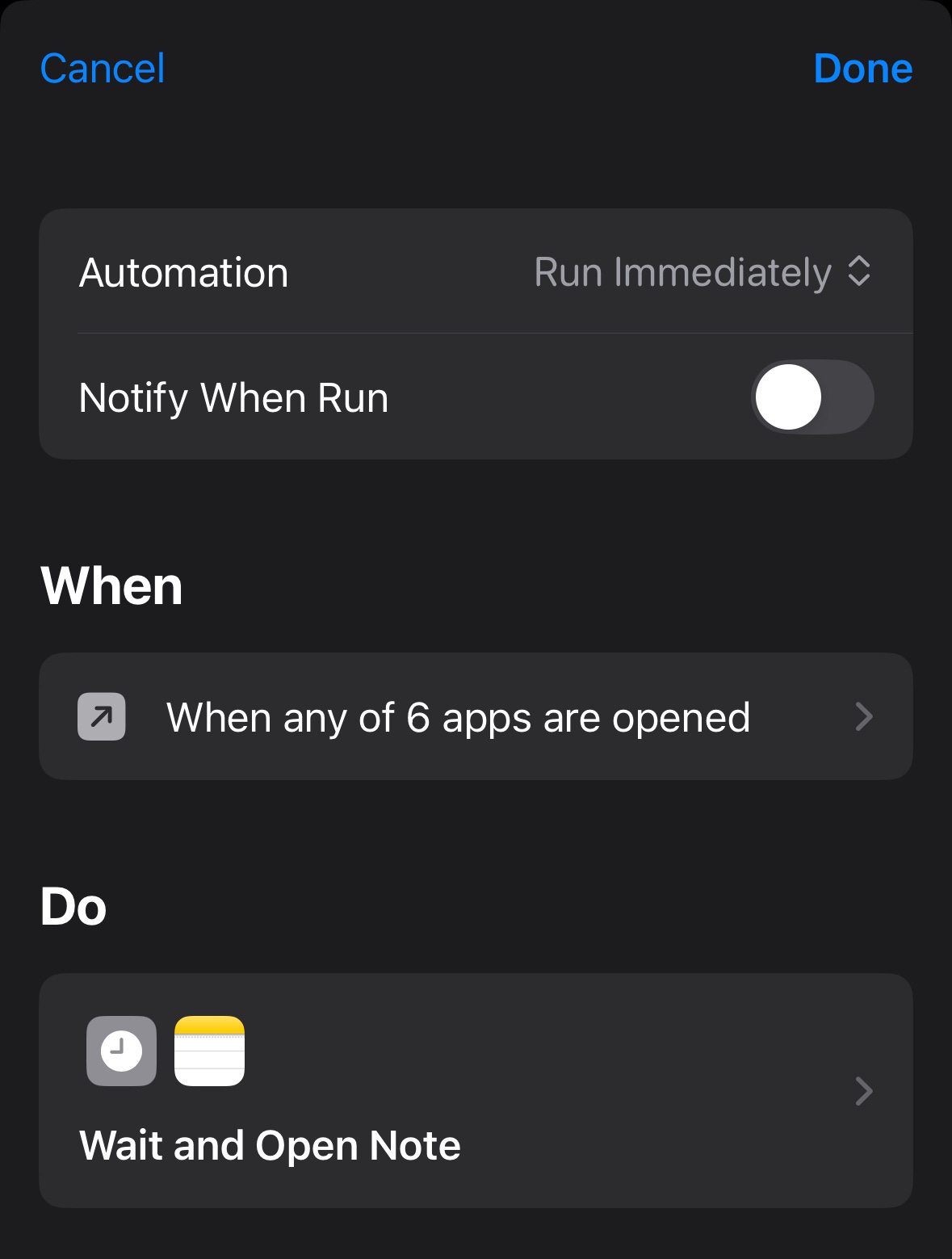
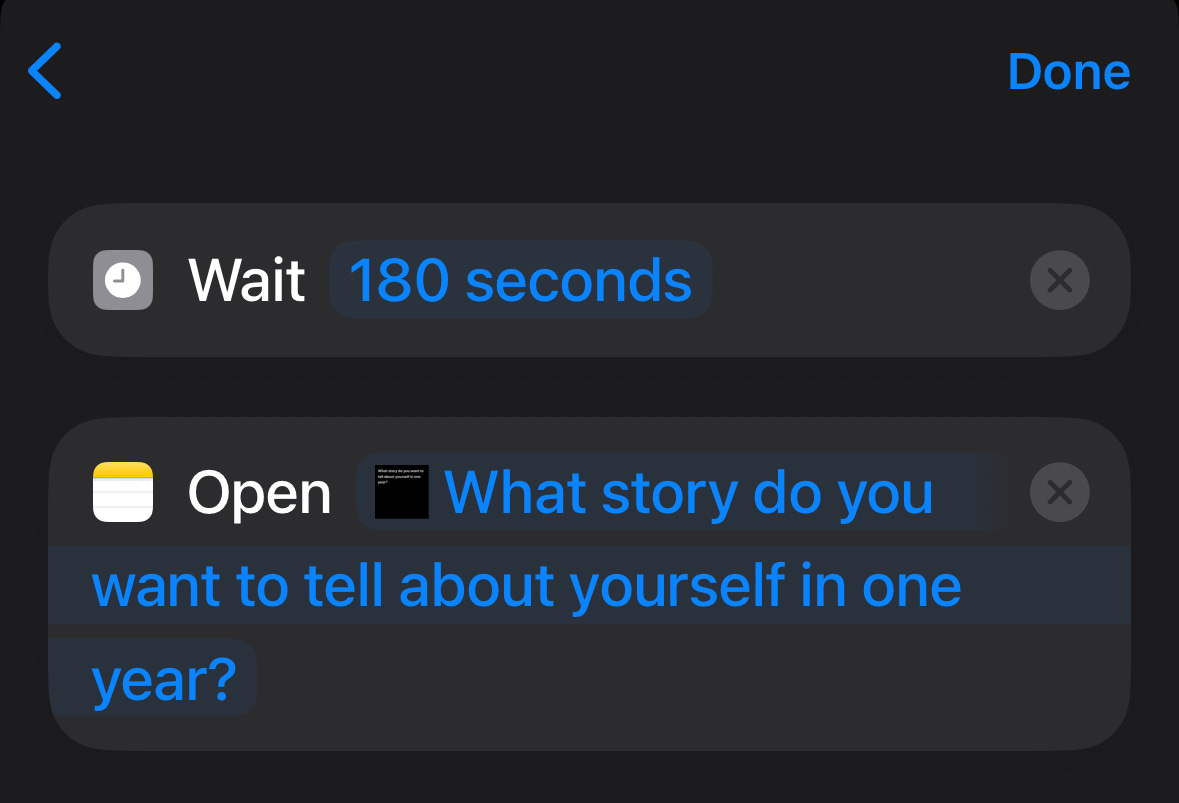
And these are the reasons why I don’t block my social from entering media apps. Instead, nothing happens for three whole minutes, after which my phone shows me a reminder of what truly matters. I can get back if I want, but I’ll keep appearing after every three minutes.
I do this for free with my iPhone by an Automation (tab inside Shortcuts app). Here’s the setup:
Part 2: Remove or hide notifications (aka make it invisible)
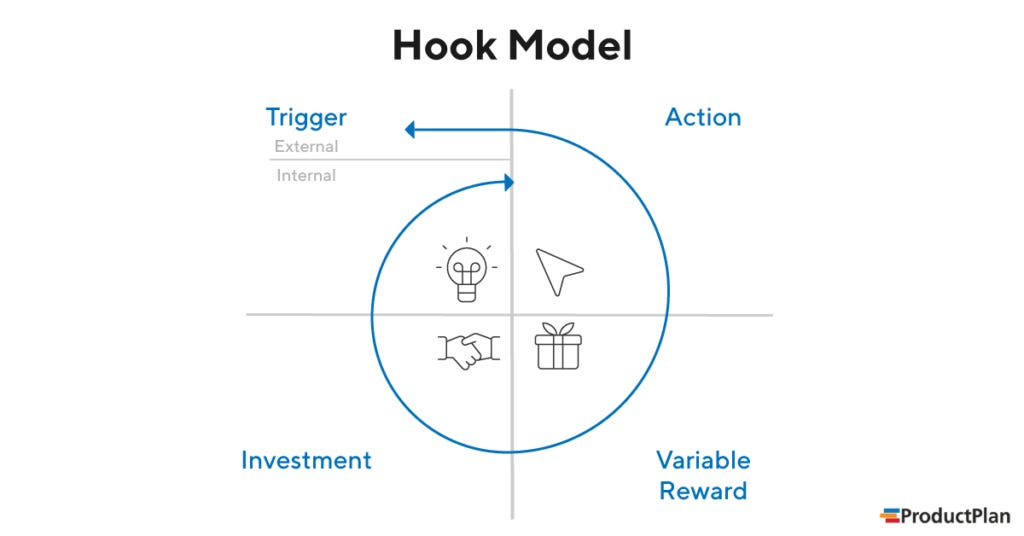
A message from a friend leads you to watch one reel, which leads you to the next.
Kill the trigger.
🔔 Silly notification detox
The average user has 80 apps installed, but most are not used daily. And they send you notifications.
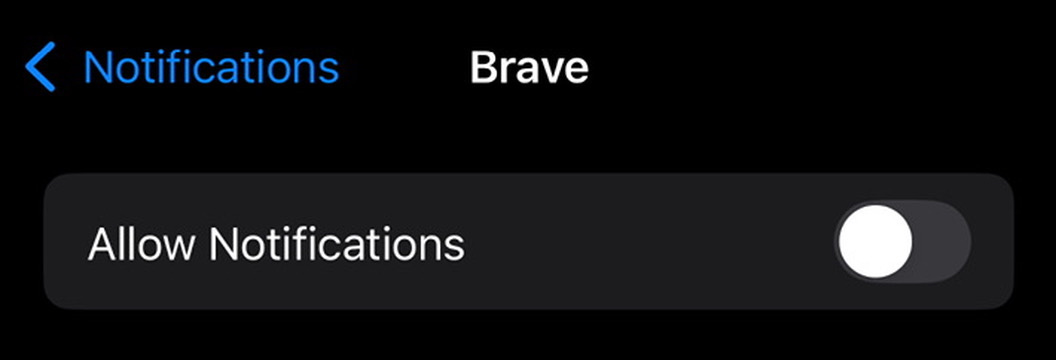
If you use an iPhone, go to Settings → Notifications. Then, toggle off “Allow Notifications” for each app that is not critical. This is not about social media.
📥 Multi-layered Inbox Zero
Some people define success by having an empty email inbox at the end of the day. I don’t. For me, success is not letting BS distract me.
That’s why I protect my primary email while I created a second address to sign up for every single non-critical tool.
I have it synced with Gmail on my phone but it’s always set as invisible (“Manage accounts”→ Toggle on/off). And when I need it, I just activate and deactivate it.
Meanwhile, very few emails land in my visible inbox.
And when I want to check my secondary inbox for a general overview, I already have multiple folders and rules set up so that I can consume specific topics I care in a given moment.
That said, some companies don’t respect users enough. So for example even if I unsubscribed from unsolicited emails from Vietnam Airlines, I kept getting trash. The problem? I couldn’t just block the sender because I need to receive flight tickets when I buy them.
I realized all the promotional SPAM came from a specific subdomain (“info”), so I created this rule:
Matches: from:(info.vietnamairlines.com)
Do this: Skip Inbox, Apply label "z-SPAM"
Here you have some other pattern-based examples and hide what I don’t care about while I see what I want from the same sender":
Matches: from:(eventbrite.com) subject:(Don't miss this new event)
Do this: Skip Inbox, Mark as read, Apply label "z-SPAM", Never send it to Spam
Matches: subject:(Your Grab ride e-receipt)
Do this: Skip Inbox, Mark as read, Apply label "z-SPAM"
Also, I get them routed to specific folders to archive if I want to keep them but they don’t deserve my attention:
Matches: from:({beneat.co lazada.co.th lotuss.com})
Do this: Skip Inbox, Apply label "Receipts"
So yeah, my secondary email inbox never reaches to inbox zero, but I can’t care less about it because what matters isn’t the tool but how the tool is used.
📃 Scheduled summaries
I get it, you want to have a social life, but don’t want to be disturbed every five minutes either.
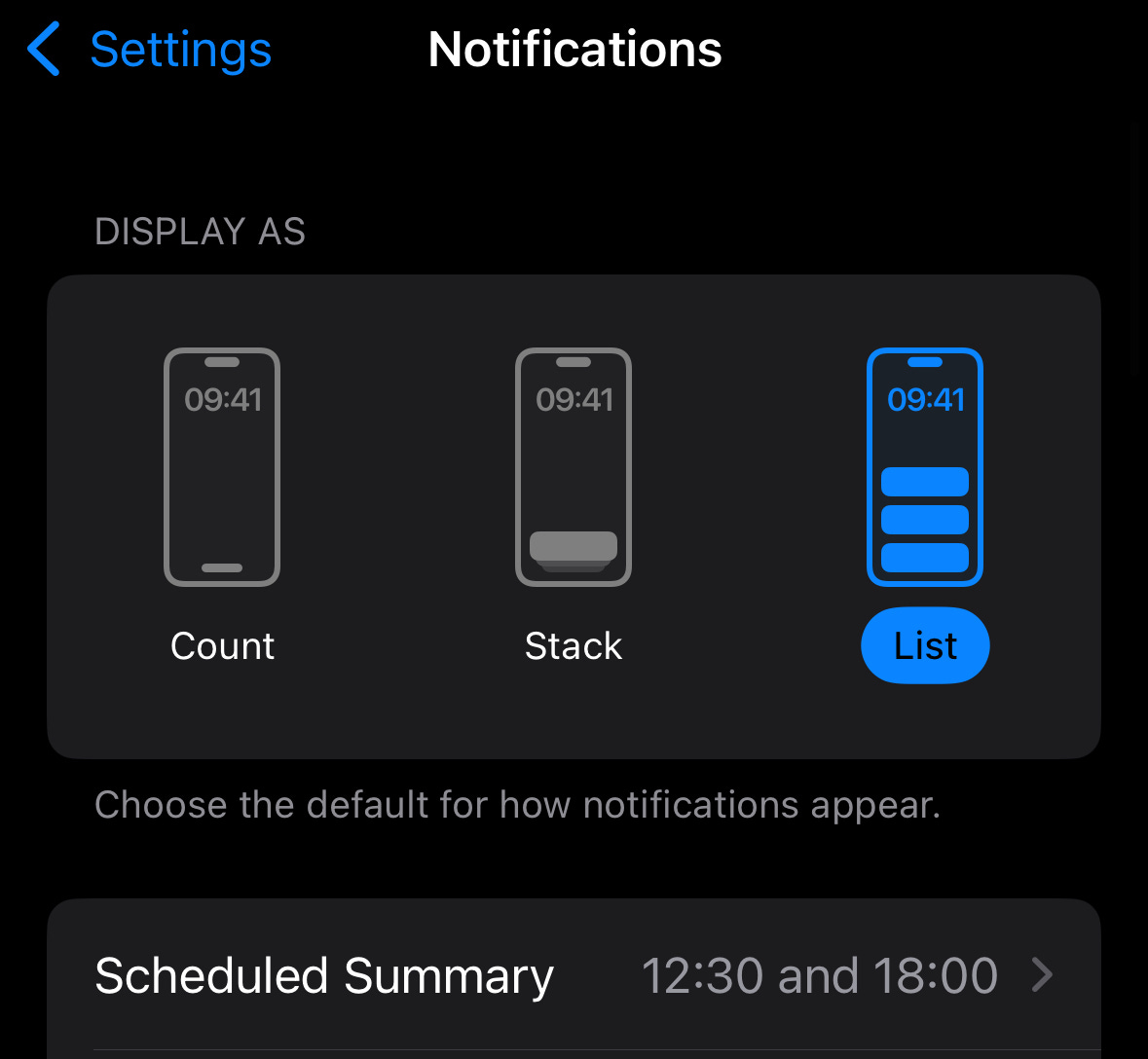
An effective solution is to use schedueld summaries to delay and group notifications to specific times, e.g. right after having lunch or when you finish work.
On iPhone, go to Settings → Notifications → Scheduled Summary.
🧘 Focus modes
Do you go to bed to late because of social media, and are distracted midnight by attractive notifications that worsens your sleep?
That’s why I have a focus mode set up on my iPhone (go to Settings → Focus) named “Sleep Focus” that blocks all app notifications to facilitate my sleep.
However, absolute rules can easily be risky, so I enable my closest circle to disturb me anytime.
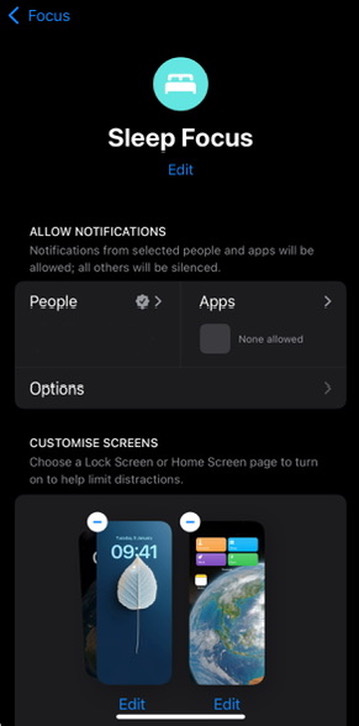
You can start it with a custom schedule, or use Automations to turn it on based on geolocation. Alternatively, you can set it on or off manually.
Part 3: Create your environment
Consuming social media is often the consequence of something else, such as procrastination from a boring and undesirable task.
Here are some tips.
👁️ Get into a time-based focus
In my previous job, there was a specific task I deeply disliked to do, so this is what I did to spend as little time as possible doing it:
I set three time blocks in my calendar to do that task so that I knew that I wouldn’t have to handle it every working day.
I recorded the time I spent on the task with Clockify, and added details about the sub-task and what I was working on. This created more urgency on me, and also had the hidden benefit of giving me more visibility into what was delaying finishing tasks the most, so I worked on ways to improve those.
And with Raycast on Mac, you can use “Start Focus Session”, which also blocks social media sites besides having a clock.
💪 Force a primacy function
Tools and spaces tend to have a primary function. For example, you could use a spoon to hammer a nail, but the first thing that comes in mind is eating.
These associations are pretty important.
Why do you (tend to) feel sleepy or lazy if you try to work in bed? Because of your mental links: Bed is to sleep.
But sometimes, you can’t. For example, imagine you have a studio and work from home. So a solution is to split what your eyes see, e.g. put a table looking to the window so that you don’t see the rest of the apartment.